Subscribe to PASCAL...
If you would like to receive the PASCAL Digest and be able to submit materials, please complete the form below:

Follow us on:
Shortlink
How do I change my password?
Please make sure you are logged in before attempting to change your password; your name should appear next to the LOG OUT at the top-right of every page.
| To change your password, click on the "My account" link at the top right-hand of every page. | 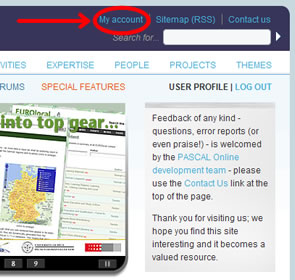 |
||
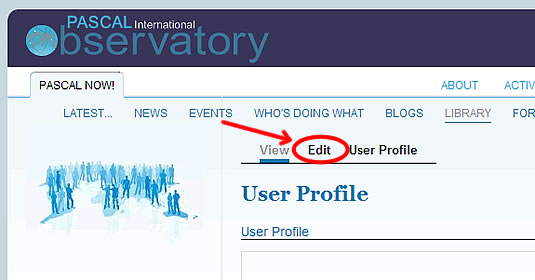
| When your details are displayed, click on "Edit". |
|
||
| Type in your new password twice... | 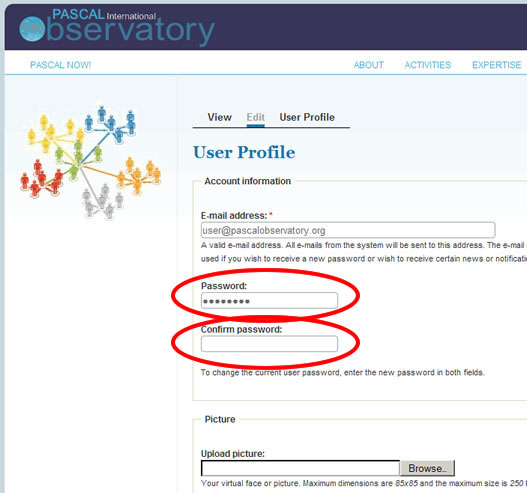 |
||
| Scroll to the bottom of the page and click on "Save" | 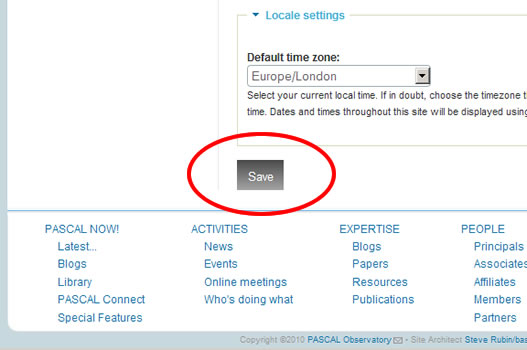 |
If you cannot change your password, please contact the System Administrator.
 Printer-friendly version
- Login to post comments
- 881 reads